We use Google Talk all the time at work to chat with people on our team. It can sometimes be limiting, though, when you want to include multiple people in the conversation, like you can on an email thread or a conference call. That's why we're really excited to announce a new feature for the Google Talk Gadget: group chat. Now, for instance, when the two of us are chatting about an upcoming launch, and we've heard that Seth knows the latest, we can just invite him to join our chat.
To start a group chat, launch the Google Talk Gadget here, and start a chat with one of your friends. Click on the button at the top of the chat window that says "Group Chat," and then pick the name of the third (or fourth, or fifth...) friend you want to invite from the drop-down menu. They'll receive an invitation to join the group chat. If your friends are using Gmail chat or the downloadable Google Talk client, their invitation will launch the Google Talk Gadget.
Rhett Robinson and Qi Ke
Software Engineers
Group Chat for the Google Talk Gadget
Monday, June 25, 2007 10:07 AM
How are you using Talk?
Friday, June 08, 2007 3:40 PM
We focus a lot in this blog on the features we're adding to Google Talk and the technology behind them. But I wanted to share a bit about our users and what they're doing with Google Talk.
As a member of the Google Talk support team, my day is usually busy reading emails reporting issues, troubleshooting, and generally learning about what's up with Google Talk users and how we can make their experience better. Mixed in to the grab bag of technical issues are bits and blurbs from users who can't get enough of Google Talk. Nothing makes my day more than hearing from Google Talk users who enjoy using the product to keep in touch with their friends, families, classmates, fellow online gamers, and business partners. It's inspiring to be a part of something that helps make the world a smaller place.
Reading stories from avid Google Talkers has made me think twice about ways to use the product. Some users have come up with creative ways to help communicate with their contacts and loved ones:
"I am hard-of-hearing and in my daily work activities, and I conduct or
participate in meetings in the form of teleconferences. I dial in on my
desk phone, but I still need help understanding the others on the line, so
I use the Google Talk client for Blackberry.
That's not all. My wife is deaf and she is from an all deaf family. We
keep in touch with each other by using Google Talk for the Blackberry (like
hearing couples tend to use their cell phones) and keep in touch with deaf
family members and many of our deaf friends, no matter which IM client
they choose." - Steve, Dunbar, IA
I also love to read about the zany and fun things people are doing with Google Talk:
She often says things like: jk[-;p//om90, or: .........ff.;;..;. ycv?"C( cc96? C9(?C'?(( (?(?9'"
It is very fun to talk to her via Google Talk. I hear that she runs
upstairs to the computer and says 'Lee lee' (her name for me) when she
hears the incoming chat sound." -Leigh, Commerce, MI
"I met my girlfriend in Abu Dhabi, UAE when I had gone back for my summer vacation. When I came back to the United States to complete my undergrad education, I didn't want to lose contact with her. We speak day and night through Google Talk. I can't count the number of times I've fallen asleep to wake up in the morning with the headset still on my head, and still connected to her." - Carnik, Abu Dhabi, UAE
If you have a story of your own, let us know!
Iris Lu
Online Sales & Ops Coordinator Permalink | Links to this post |
Something to :) about
Thursday, May 24, 2007 4:10 PM
Tired of expressing emotions to your friends with words? Exhausted by the two and sometimes three keys you have to press to enter an emoticon? The Google Talk Gadget has got your back. Today we're introducing an emoticon menu to put those :D and :-( feelings right at your fingertips. We've also heard you asking for a wider emoticon selection, so we added some new choices. You can choose from three different styles of emoticons. Maybe you like things simple and classic  . Maybe you like them colorful and fun
  . Or maybe you're a square
  . Everybody can be themselves with the Google Talk Gadget, and you'll find it right here.
Jake Knapp
User Interface Designer
Talking with TypePad
Monday, May 21, 2007 9:42 AM
I was excited when the Google Talk Gadget launched in March, since it meant there was one more way to chat with your buddies on the Web -- it let you access Google Talk as a gadget on iGoogle or add it to your own Web page. Today we're pleased that TypePad has syndicated the Google Talk Gadget to their Widget Gallery, and we're looking forward to staying connected with our fellow bloggers. Check it out here: http://www.sixapart.comtypepad
Mary Himinkool
New Business Development
Popouts, Buttons and Slideshows
Tuesday, April 03, 2007 5:53 PM
As an engineer, one of my favorite aspects of delivering Google Talk through the web is that we can enhance it quickly. In fact, we updated the Google Talk Gadget today with a few new features:
(1) To make it easier to use Google Talk anywhere, we made it possible to pop out the Google Talk Gadget into a separate window. If you're using Google Talk on your Google Personalized Homepage, you'll find a link in right inside the gadget that lets you pop it out. You can also find the popout version of the gadget at http://www.google.com/talk.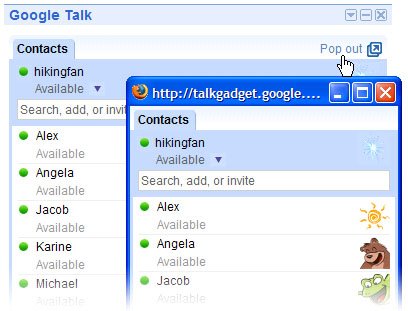
(2) For website owners and bloggers, we announced earlier that you can add Google Talk to your own webpage with a single line of code. To take advantage of the new pop-out functionality, we created a new way to add Google Talk to your website: a button you can add that lets your visitors launch Google Talk in a separate window.
To add the button, just copy and paste this script into your site's HTML:
(3) We also wanted to highlight a way to use the gadget that others discovered shortly after our first release. If you use Firefox, you can run the gadget in your Firefox sidebar, so it stays open when you navigate from page to page in the main frame. Just click on the link below:
Google Talk Sidebar
You can also bookmark Google Talk for your sidebar in Firefox. Right click on the link above. Select "Bookmark this Link," then "Create In: Bookmarks Toolbar." Next open the Bookmarks menu from the Firefox menu bar, right click on the Google Talk bookmark entry, and select "Properties." In the menu that opens, check the box that says: "Load this bookmark in the sidebar."
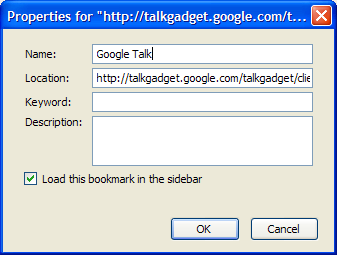
When you open the bookmark, the gadget will load in the sidebar on the left.

(4) We also added some new media viewing capability to the gadget. In addition to watching YouTube videos and Picasa Web Albums slideshows, you can now also view Flickr photo slideshows by pasting URLs from Flickr into your chats.
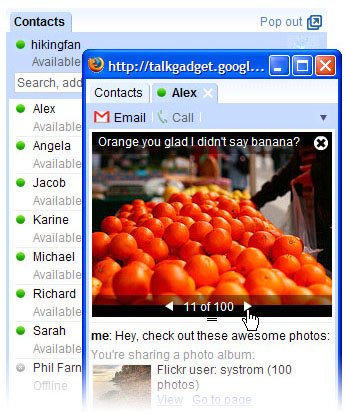
We look forward to adding more and more features to the gadget. And you don't need to do anything to get the updates. Each time you load the gadget you will have the latest version.
Scott Ludwig
Software Engineer Permalink | Links to this post |
Google Talk Gadget
Wednesday, March 14, 2007 2:57 PM
We're thrilled to be launching a new way to use Google Talk today. The Google Talk Gadget is a web-based module that you can add to your Google Personalized Homepage, letting you see your friends and chat with them -- all on your homepage.
We know a lot of people love being able to chat with their friends in Gmail Chat, so we created the Talk Gadget to offer that experience in other places, starting with the Google Personalized Homepage. You'll also find all your Gmail and Google Talk contacts organized for you in the Talk Gadget. And just like with Gmail Chat, you don't have to download and install software to use it. One thing we really like is that it looks and feels the same on a Linux desktop as on a Windows laptop, and it also works on Macs. No matter where you go, all you have to do is login to your Google account, and there it is.
And if you have a webpage or blog, you can put the Google Talk Gadget in those places too, so your visitors can sign in and start instant messaging right from your page. If you post your username next to it, visitors can add you as a contact and start chatting with you right away. Like most other gadgets, you can do this by pasting a single line of code into your page, which you can find here.
We worked hard to make the Google Talk Gadget embody the same simple, clean feel of Gmail Chat and the Talk download client--but we threw in some extra goodies too. You'll notice that your conversations all open up in tabs inside the Gadget. And one of the coolest features in the Google Talk Gadget is the ability to do media previews. When we're not busy working on new features for Talk, we're checking out "Ask A Ninja" on YouTube or Friday night's party photos on Picasa Web Albums, sending around links to this multimedia in our chats, and posting them in our status messages. It was just plain silly that our IM client didn't know more about photos and videos other than the fact that it was a link. So by scratching our itch, we can now watch YouTube videos and see Picasa Web Albums photos inside of the Google Talk Gadget anytime someone IMs us a link or sets it as their status message.
So give it a try, let us know what you think, and keep an eye out for lots of improvements to come!
Dudley and Wes Carr
Software Engineers
P.S. Get a sneak peek at the Google Talk Gadget in this short video:
Twittering with Google Talk
Wednesday, February 28, 2007 12:54 PM
What are you doing right now? It's a pretty simple question. Me? I'm writing this post. Maybe you're "eating a magnolia cupcake," or "at work, but shopping online." Or maybe you're "thinking of how to use the word of the day in a sentence: polypropolene."
Twitter is a site that makes it easy to let the world know what you're doing, and see what other people are up to in a fun, social environment. You can think of it as low-effort mini-blogging. And you can update your status with even less effort by using Google Talk. Just add twitter@twitter.com to your contact list and shoot off an IM to it about how you're "cooking up some spicy chicken jambalaya" or "walking the cat." (Cats can go on walks, too.)
You can also use Talk with Twitter on a mobile device. Using the RIM Blackberry Google Talk Client you can quickly and easily send status updates to Twitter, and we'll all know how you're shoveling yourself out of a foot of snow. Advanced apologies to our NYC office, we've got sun here in Mountain View.
Add twitter@twitter.com to your Google Talk contacts to check it out.
Bill Kee
Associate Product Marketing Manager



